

Guides Developer Tools & Vibe Coding
GitHub Copilot Adds Server-to-Server Authentication for AI Agents: What Developers Need to Know
On October 27, 2026, GitHub introduced public-preview server-to-server authentication for GitHub Copilot SDK applications. The update allows organization-installed GitHub Apps to make Copilot requests without relying on an individual developer's credentials. It also brings organization-level billing, model policies, spending controls, and usage attribution into automated AI workflows. Here's how i
GitHub Copilot Adds Server-to-Server Authentication for AI Agents: What Developers Need to Know #
AI-powered development tools are increasingly moving beyond individual coding assistants. Developers are building services that automatically investigate issues, generate code, run workflows, and coordinate software development tasks with minimal manual intervention.
However, these systems introduce an important engineering challenge: how should an automated service authenticate when it needs to use an organization's AI coding capabilities without depending on a particular developer's account?
On October 27, 2026, GitHub announced server-to-server authentication for GitHub Copilot SDK applications, available in public preview.
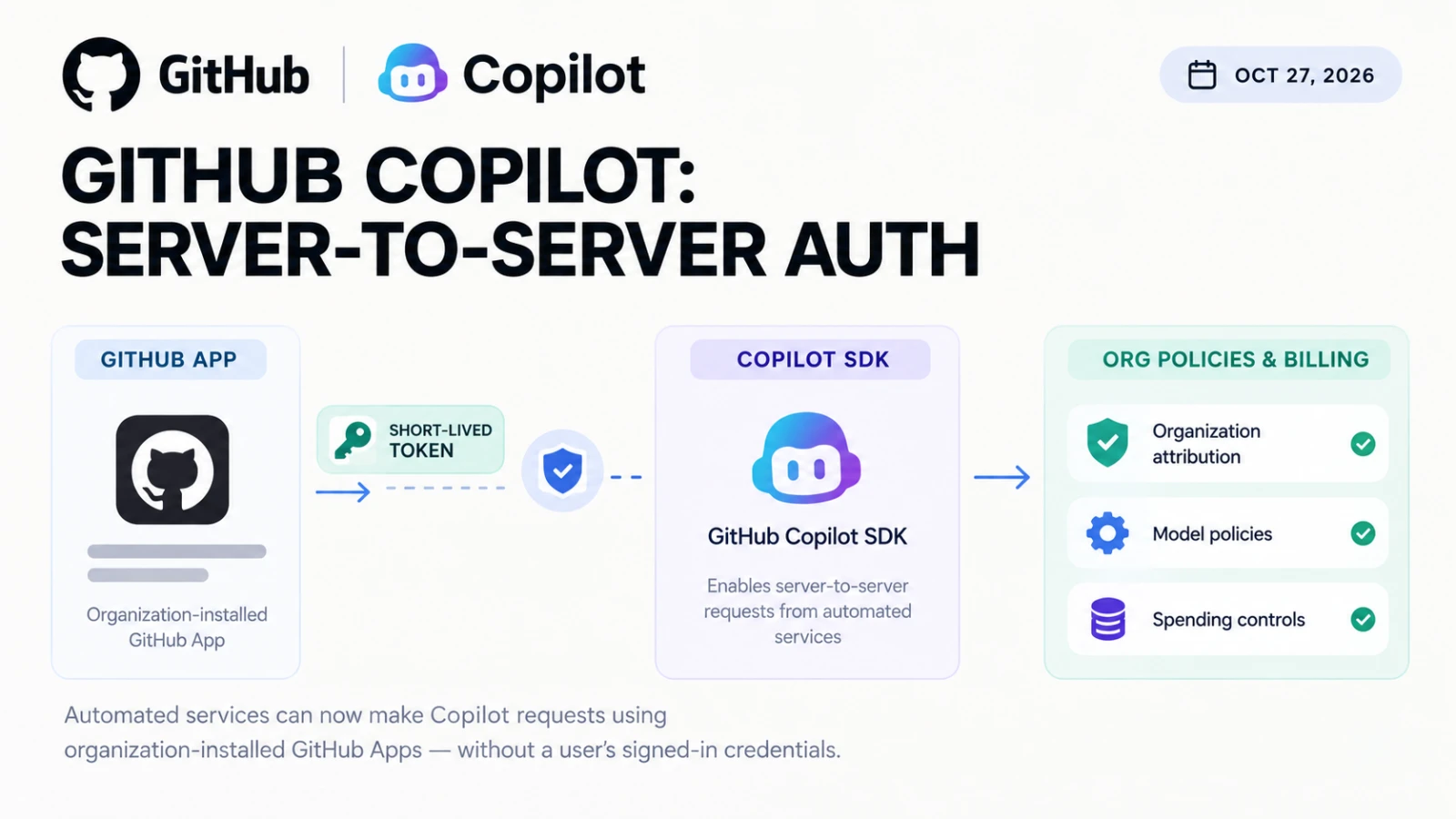
The update allows organization-installed GitHub Apps to make Copilot requests using their own installation access tokens instead of relying on a signed-in user's credentials.
It also gives organizations visibility into app-attributed usage and applies existing organization-level model policies and spending controls.
For teams building internal coding agents, automated development services, and AI-powered engineering workflows, this change addresses an important part of deploying those systems reliably.
What Is GitHub Copilot Server-to-Server Authentication? #
Traditionally, an application that uses a developer's authenticated session can inherit dependencies on that user's credentials, access, or account status.
That arrangement can become inconvenient when a service needs to run continuously or execute automated tasks independently of an individual developer.
GitHub's new authentication option introduces a different approach.
An organization can install a GitHub App with the required Copilot Requests permission. The application receives a short-lived installation access token and passes it to a service built with the GitHub Copilot SDK.
The service can then make Copilot requests on behalf of the organization without requiring a developer to remain signed in.
GitHub describes this as workload-owned identity: authentication and usage are associated with the installed application and its organization rather than being tied to an individual user.
The feature is currently in public preview, so its implementation and availability may change.
Official announcement: https://github.blog/changelog/2026-10-27-github-copilot-supports-server-to-server-authentication/
Why This Matters for AI Development Agents #
Consider a software company that builds an internal agent to investigate bugs.
When an issue is reported, the service might need to inspect the relevant repository, analyze the problem, propose a fix, and prepare changes for developer review.
The company wants this process to run automatically, including outside normal working hours.
If the service depends on a developer's personal credentials, account changes or authentication problems can create unnecessary operational dependencies.
A dedicated application identity provides a more appropriate foundation for this kind of workload.
Potential use cases include:
- Internal AI coding agents that run scheduled tasks.
- Automated development services that process issues.
- Applications that use the Copilot SDK as part of a larger workflow.
- Organization-managed services that need centralized usage attribution.
- Background processes that should operate independently of individual developer sessions.
The new authentication method addresses the identity and access portion of these workflows. It does not automatically grant an agent permission to every repository or authorize every possible action.
The service still needs appropriate permissions, a supported configuration, and safeguards around the work it performs.
How the New Authentication Flow Works #
The process involves several steps.
1. Create a GitHub App #
An organization creates or configures a GitHub App for the service that needs to make Copilot requests.
The app must have the organization-level Copilot Requests permission configured as read-only.
Despite the name, this permission does not mean the service can only consume resources without cost. It authorizes Copilot requests that count toward the organization's usage.
2. Install the App on the Organization #
The app is installed on the organization whose Copilot usage should be attributed and billed.
This establishes the organizational identity for the workload.
Administrators should verify the app's owner, purpose, requested permissions, and expected usage before approving installation.
3. Generate a Short-Lived Installation Token #
The service obtains an installation access token with the required Copilot permission.
According to GitHub's documentation, these installation tokens expire after one hour.
Applications therefore need a token-refresh strategy rather than treating the token as a permanent credential.
Short-lived tokens also reduce the period during which a leaked token can remain useful.
4. Pass the Token to the Copilot SDK #
The service supplies the installation token through the SDK's supported authentication option.
GitHub's documentation provides examples for TypeScript, Python, Go, Rust, .NET, and Java.
For example, a Python application can pass the token explicitly:
import os

from copilot import CopilotClient, RuntimeConnection

client = CopilotClient(
    connection=RuntimeConnection.for_stdio(),
    github_token=os.environ["INSTALLATION_TOKEN"],
    use_logged_in_user=False,
)
This is a simplified configuration example, not a complete production application. The surrounding service must still handle token creation, refresh, errors, logging, and lifecycle management.
Setting use_logged_in_user=False prevents the SDK from relying on automatic discovery of a signed-in user's credentials.
5. Apply Organization Policies and Billing #
Once configured, Copilot requests are attributed to the organization that owns the app installation.
The organization's applicable model policies, budgets, and spending controls continue to apply.
Administrators can also inspect app-attributed usage through AI usage CSV reports.
Official implementation guide: https://docs.github.com/en/copilot/how-tos/copilot-sdk/auth/server-to-server-tokens
Organization-Level Billing and Usage Visibility #
One of the most important aspects of this announcement is usage attribution.
When multiple automated services use an organization's AI capabilities, engineering leaders need to understand which applications are consuming resources.
GitHub's implementation identifies app-attributed usage through the app_client_id field in AI usage CSV reports.
Administrators can match this identifier with the organization's GitHub App installations to determine which app generated the usage.
This can help organizations:
- Investigate unexpected consumption.
- Identify which automated services are using Copilot.
- Review the purpose and ownership of individual integrations.
- Understand how automated workloads contribute to organizational usage.
- Make more informed decisions about AI adoption.
There is an important limitation: GitHub does not provide a separate spending budget for each app installation through this mechanism.
Usage falls under the organization's Copilot budget and applicable controls. Organizations that need usage to stop when a budget is reached must ensure the relevant stop-usage control is enabled.
This makes centralized governance useful, but it does not replace application-level monitoring or cost allocation practices.
Security Considerations Before Enabling It #
Removing a dependency on personal credentials is useful, but it does not automatically make an automated service secure.
Organizations should review several areas before allowing an app to use Copilot.
Review App Ownership and Permissions #
Only approve applications whose ownership, purpose, and expected usage are understood.
Check all requested organization and repository permissions. The Copilot Requests permission must be read-only, but it can still authorize usage that incurs costs.
Protect Installation Tokens #
Installation tokens should be handled as sensitive credentials.
Avoid embedding them in source code, committing them to repositories, or exposing them through logs.
Use an appropriate secret-management mechanism and refresh tokens before expiration.
Monitor Usage and Spending #
Review AI usage reports and organization spending policies.
If a workload unexpectedly increases consumption, administrators should be able to identify the responsible app and investigate its behavior.
Provide a Way to Revoke Access #
Organization owners can suspend or uninstall an app to stop its access.
However, GitHub notes that this also blocks the installation's access to other organization resources. Revocation should therefore be coordinated with the service's operational requirements.
Keep Agent Actions Under Control #
Authentication only establishes how a service accesses Copilot. It does not guarantee that generated code is correct, secure, or appropriate to merge.
Automated workflows should still include relevant testing, code review, permission checks, and approval requirements.
Important Limitations Developers Should Understand #
The feature has several boundaries.
It is in public preview. Availability and behavior may change before general availability.
It applies to organization-installed apps. GitHub's documentation says this authentication method does not apply to personal-account or enterprise installations.
It requires an eligible organizational setup. Administrators should verify their Copilot plan, organizational settings, and app permissions before implementation.
Tokens expire. Services need a reliable token-generation and refresh process.
Budgets are organization-level. A separate spending budget cannot be created for each app installation through this feature.
It is different from GitHub Actions authentication. Workflows running in GitHub Actions can use the built-in GITHUB_TOKEN through the documented authentication path. Other services and CI systems may require the GitHub App installation-token approach.
These distinctions matter when choosing the right authentication model for a particular application.
Who Should Evaluate This Update? #
The feature is especially relevant to teams building services around the GitHub Copilot SDK.
Developer Platform Teams #
Teams building internal developer platforms can evaluate whether organization-owned authentication simplifies the deployment of shared coding services.
Engineering Automation Teams #
Organizations using automated services to investigate issues, process development tasks, or coordinate workflows can assess whether the new identity model fits their architecture.
Enterprise Administrators #
Administrators responsible for AI usage, permissions, and spending can evaluate the new attribution and governance options.
AI Application Developers #
Developers building applications around the Copilot SDK can use the official documentation to understand the authentication flow and its supported implementation patterns.
Teams that only use Copilot interactively may not need to change their existing setup.
How to Get Started #
GitHub's announcement and documentation provide the starting points for evaluating the feature.
A practical implementation sequence is:
- Read the official server-to-server authentication guide.
- Confirm that the organization is eligible and has the necessary Copilot settings enabled.
- Create or configure a GitHub App with the required permission.
- Install the app on the intended organization.
- Implement short-lived token generation and refresh.
- Configure the Copilot SDK to use the installation token without falling back to user credentials.
- Test authentication failures, usage attribution, and revocation.
- Verify organization-level spending controls before deploying the service broadly.
Start with a limited internal workload before expanding the integration to more teams.
Documentation: https://docs.github.com/en/copilot/how-tos/copilot-sdk/auth/server-to-server-tokens
Final Verdict #
GitHub's October 27, 2026 update gives developers a new way to authenticate automated applications that use the Copilot SDK.
The central change is the separation of an automated workload's identity from an individual developer's signed-in session.
Combined with organization-level billing, model policies, usage attribution, and access controls, this creates a more manageable foundation for certain AI-powered development services.
However, the feature remains in public preview, and successful adoption still depends on careful permission management, token handling, monitoring, and testing.
For teams building organization-managed coding agents or automated development services, it is worth evaluating.
For teams that do not run these workloads, there may be no immediate reason to change their current authentication setup.
The best approach is to assess the specific workflow, verify the organization's eligibility, and introduce automation with clear operational and security boundaries.
Discover More Developer Tools #
GitHub Copilot is one part of a broader developer software ecosystem. Depending on your workflow, you may also need source control, CI/CD, code review, security scanning, project management, or AI development tools.
Explore developer tools and software categories on Vouchfull to discover products that match your team's needs.